Set Up Specky Without Leaving Claude or ChatGPT
Add the Specky connector, say "help me get set up", and your assistant walks you through the one step that matters next. Only integration sign-ins still need the browser.
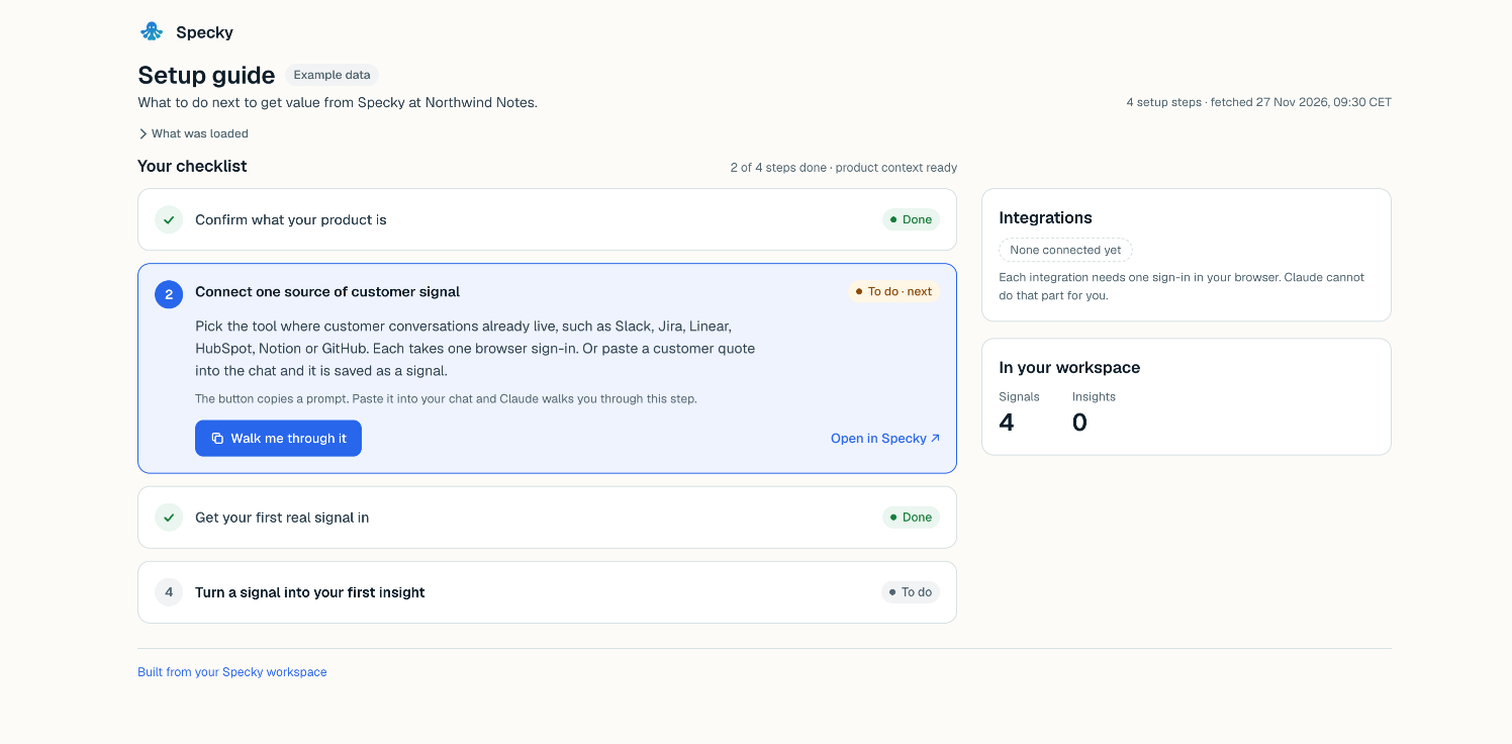
Most product tools make you learn them before they help you. If you already live in Claude or ChatGPT, that is backwards: the assistant is where you think, so it should also be where you set things up.
That is now how Specky works. Add the Specky connector, type "help me get set up", and your assistant knows exactly where your workspace stands.
What happens when you ask
The connector has a tool called get_setup_status. Your assistant calls it first in a new workspace and gets four steps back:
- Confirm what your product is. Specky needs a name, a one-line description and ideally your site, so it never builds on a wrong guess.
- Connect one source of customer signal. Slack, Jira, Linear, HubSpot, Notion or GitHub.
- Get your first real signal in.
- Turn a signal into your first insight.
Your assistant walks you through whichever step is next, in plain words, and gives you a link for anything that needs the browser.
What still needs the browser
One thing: connecting an integration. Slack or Jira will only hand over access after you sign in to them yourself, so your assistant gives you the link and waits. Everything else happens in the chat. No source yet? Paste a few customer quotes and they are saved as signals straight away.
No account yet?
If you add the connector before you have a Specky workspace, the sign-in screen now offers to create one. Tell Specky what you are building, and a Finish connecting banner brings you back to approve the connection. You are back in Claude or ChatGPT without starting over.
Try it
Add Specky as a custom connector with the URL https://www.specky.space/api/mcp, then say "help me get set up". The setup guide board shows the same checklist as a page you can keep open.
Keep reading
Give Claude Code and Cursor Your Product Context via MCP
Specky's MCP server hands coding agents the approved spec, product context and your engineering rules, then checks the plan and the finished change before a run counts as done.
Verify Claude Code and Cursor Changes Before They Say Done
Specky gives Claude Code and Cursor product context over MCP, then checks the changed files for out-of-scope edits, likely secrets and missing tests before a run passes.
A Goal Tracker That Never Fakes a Percentage
Goals by quarter, at-risk ones first, and a progress bar only where the numbers support one. Built by Claude from your Specky workspace.