Every Board Your AI Builds Now Looks Like Specky
Boards that Claude or ChatGPT build from your Specky workspace now carry the Specky logo, colours and layout, in light and dark, instead of looking like a generic dashboard.
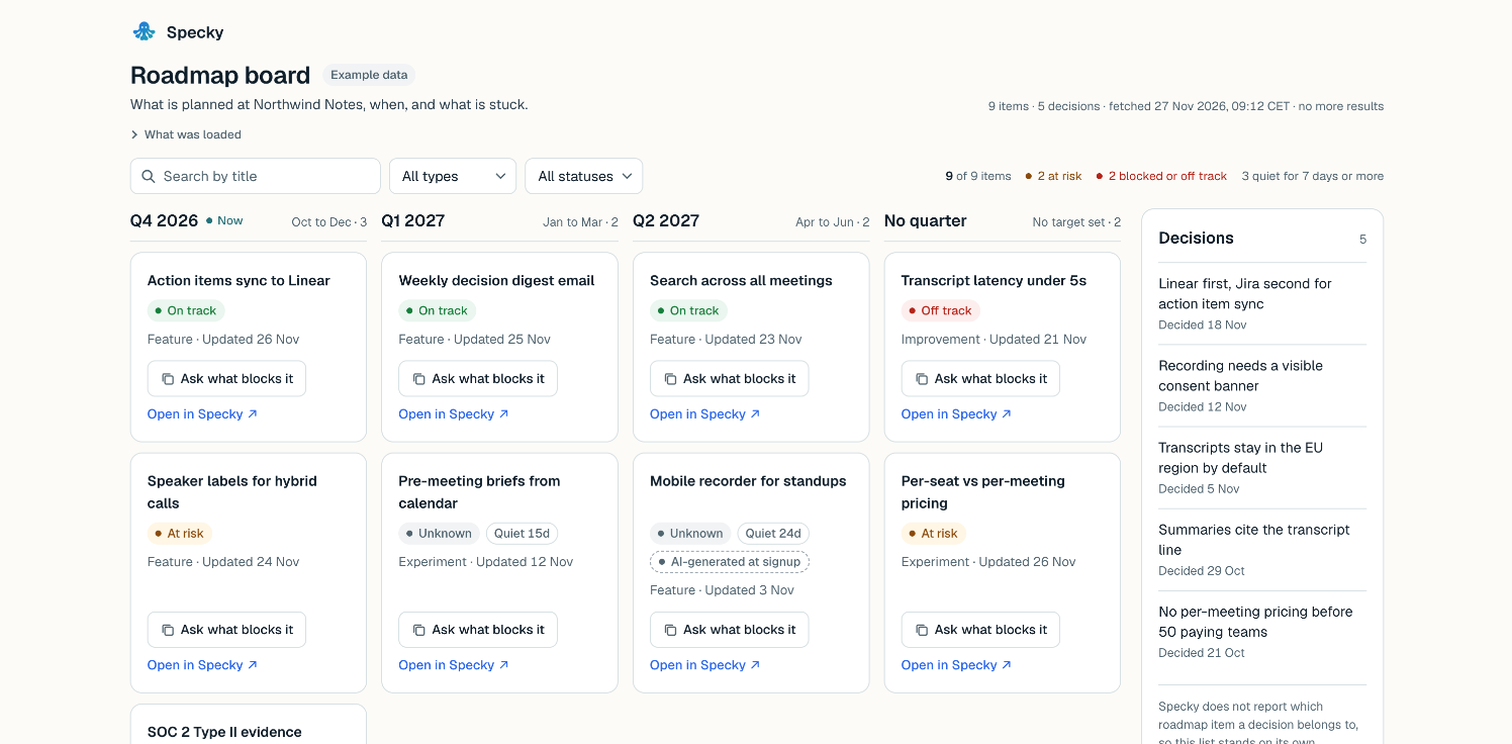
When an AI assistant builds you a dashboard, it usually looks like every other AI dashboard: a purple gradient, oversized cards and a font nobody chose. That is fine for a one-off. It is not fine for a board you open every morning.
So the Specky connector now ships its own look.
What changed
There is a new read tool, get_brand_kit. Every Specky board recipe tells your assistant to call it first. It returns:
- The Specky logo as inline SVG. Artifact sandboxes often block outside images, so the logo travels inside the response and always renders.
- Our colours, the same tokens as the app and our emails, for light and dark mode.
- Status colours with meaning: on track is green, at risk is amber, blocked is red, unknown is grey.
- Type and layout rules: one accent colour, calm cards, readable from 360px wide, real empty and error states, and a footer that links back to Specky.
Why it matters
A board that looks like Specky reads as part of your product system, not a throwaway. It is also more honest: the same status colours mean the same thing on every board, so "at risk" never looks like "done" because one artifact picked a different palette.
How a board should look
The kit also sets a few rules we learned while testing. The header says in plain words what was loaded and when, for example "24 decisions, fetched 9:40, snapshot". The exact tools and filters go in a small What was loaded disclosure, out of the way. The board follows your system's light or dark setting instead of adding its own toggle. And a "nothing matches" message only appears when the list is actually empty, never next to results.
Try it
In Claude or ChatGPT with the Specky connector, ask for any board, for example "show me my roadmap as a board". Your assistant fetches the recipe and the brand kit on its own. See every Specky board for what you can build.
Keep reading
Give Claude Code and Cursor Your Product Context via MCP
Specky's MCP server hands coding agents the approved spec, product context and your engineering rules, then checks the plan and the finished change before a run counts as done.
Verify Claude Code and Cursor Changes Before They Say Done
Specky gives Claude Code and Cursor product context over MCP, then checks the changed files for out-of-scope edits, likely secrets and missing tests before a run passes.
A Goal Tracker That Never Fakes a Percentage
Goals by quarter, at-risk ones first, and a progress bar only where the numbers support one. Built by Claude from your Specky workspace.