Specky board recipe
Keep a decision log in Claude, built from Specky
“What did we decide, why, and did it work?”
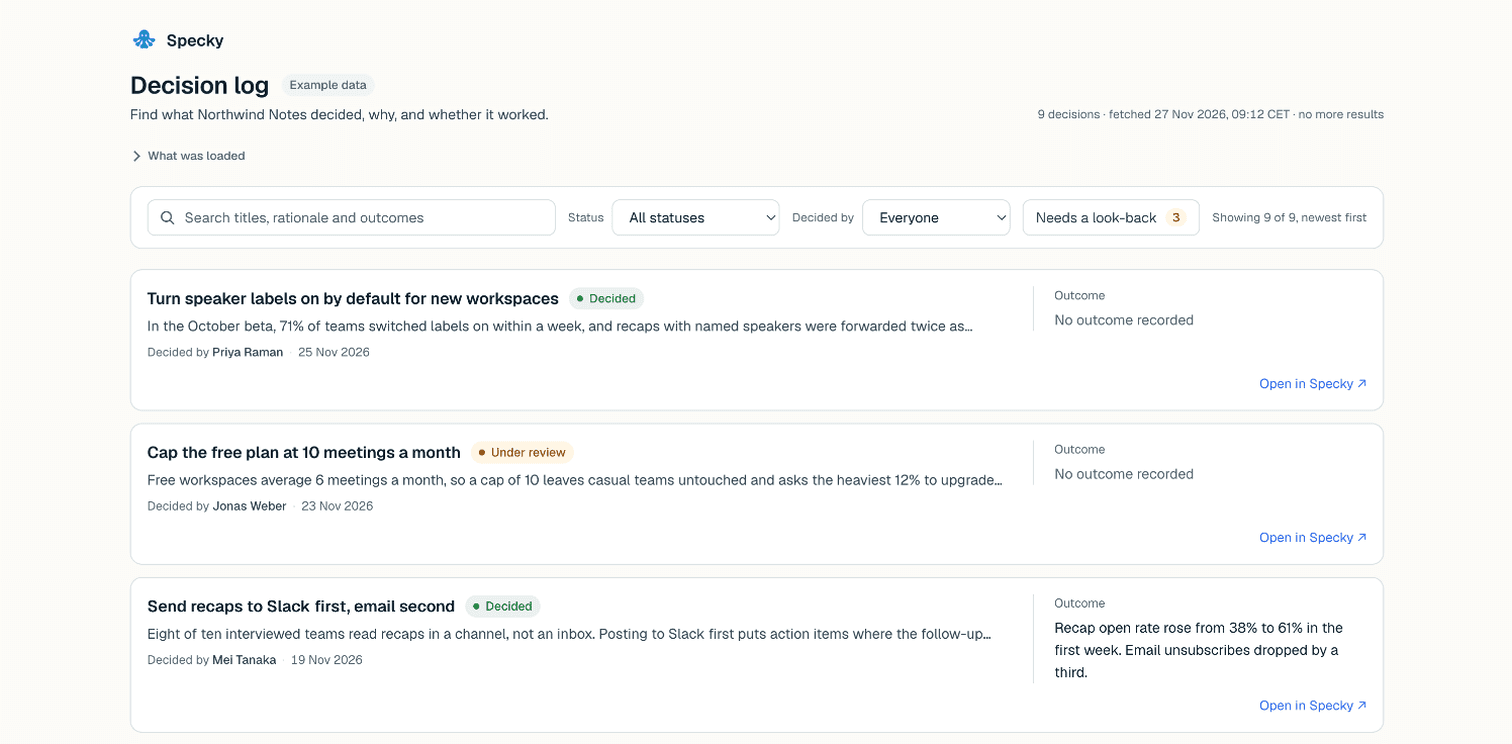
Claude builds a log of every decision in your workspace, newest first, with the rationale a click away. Decisions that are old enough to judge but have no outcome are flagged for a look-back.
What you see
- Each decision with who made it, when, its status and its recorded outcome.
- The rationale as a one-line preview, and the full decision in a details drawer.
- A Needs a look-back filter for older decisions with no outcome yet.
- A Draft a look-back button that copies a ready prompt. Paste it in the chat and Claude drafts the look-back for your approval.
How to build it
- 1Add Specky as a custom connector in Claude (ChatGPT works too, on plans that allow custom connectors) with the URL
https://www.specky.space/api/mcp. Sign in and pick your workspace. Step by step - 2Ask your assistant to “build my decision log with Specky”, or paste the recipe below into a new chat for full control.
- 3Your assistant reads your workspace, applies the Specky look and builds the board next to the chat.
Decision log recipe
A private decision log over your live Specky workspace: what was decided, by whom, why, and what came of it.
Build me a private interactive decision log as an interactive artifact (a canvas or app if you are not Claude), using my connected Specky connector. It should help me find what we decided, why, and whether it worked.

1. Use my real workspace
- Find the Specky connector and call its tools now. Read only with: get_brand_kit, list_workspace_items, read_workspace_item.
- Call get_brand_kit first and build in its look.
- Never use sample, placeholder or invented data. If a call fails, show the error on the board instead of filling the gap.
- If the Specky connector is not connected, stop and ask me to connect it as a custom connector at https://www.specky.space/api/mcp.

2. Be honest about scope
- Show what was loaded in plain words in the header: the item count, the fetched time, and whether more results remain (has_more is true, or a tool without has_more returned exactly its limit). Put the exact tools and filters in a small "What was loaded" disclosure, not in the header.
- Never present a partial list or a failed request as the complete picture. Show a missing field as "unknown", never as zero.

3. Load
- list_workspace_items with types ["decision"] and limit 100. Follow next_cursor while has_more is true, up to 5 pages, and say so if more remain.
- read_workspace_item for one decision at a time, only when I open its details drawer.

4. Log view
- Newest first. Each row shows the title, fields.decided_by, fields.decided_at, status badge, fields.outcome (or "no outcome recorded") and a link to its url.
- Show fields.rationale as a one-line preview; the drawer shows the full item.
- Flag decisions older than 28 days with no outcome as "needs a look-back". Show a missing field as "unknown", never as an empty claim.
- Filter by status and decider, plus a text search.
- Every card links to its item's url in Specky.
- Label items whose fields.origin is "onboarding" as "AI-generated at signup", so they never read as my team's own work.

5. Hand-off
Each row has a "Draft a look-back" button that copies: "In Specky, read decision <id> with read_workspace_item and draft a look-back: did it work, what changed. Draft it here first; only after I approve, save it with create_document, which saves a draft." Use the real id.

6. Stay read-only
- The artifact must never call any Specky tool not listed in step 1.
- Drafting happens in this chat, not in the artifact: use a copy button labelled with what it drafts or asks (for example "Draft a look-back") whose prompt names the exact item id and tells Claude to draft in the chat first and save nothing until I approve.

7. Make it work
- Look like Specky: the get_brand_kit logo inline with the word "Specky" in the header, its light and dark colours, status badge pairs, type scale, layout rules and footer. Never a generic dashboard.
- Readable cards, a search box and a details drawer. Polished empty, loading and error states. Usable from 360px wide.
- If the artifact cannot re-call the connector itself, label the data "Snapshot" with its fetched time. Never show a "Live" label you can't back.
- Keep the artifact private. People outside my organization get no connector access, so share this recipe, never a board that carries my data.
What it reads from Specky
The board only reads. Anything that writes happens in the chat, after you say yes.
get_brand_kitThe Specky logo, colours and layout rules, so every board your AI builds looks like Specky in light and dark.list_workspace_itemsOpportunities, decisions, experiments, OKRs, tickets, insights and objectives with their status and a link back to Specky, ready for your AI to build a board from.read_workspace_itemRead a full PRD, decision, insight or ticket with its links.
Good to know
- A missing field shows as unknown, never as an empty claim.
- Look-backs are drafted in the chat and saved only after you approve them.
Why it works this way: read the launch note →
More Specky boards
No Specky workspace yet?
Sign up, then add the connector. Or start in Claude: add the connector and it asks you to sign up.
Card required · Nothing charged until day 14 · 30-day refund