Triage Customer Signals in Claude, One Insight at a Time
Group this week's signals by source, check them against the insights you already have, and hand the new ones to Claude to draft.
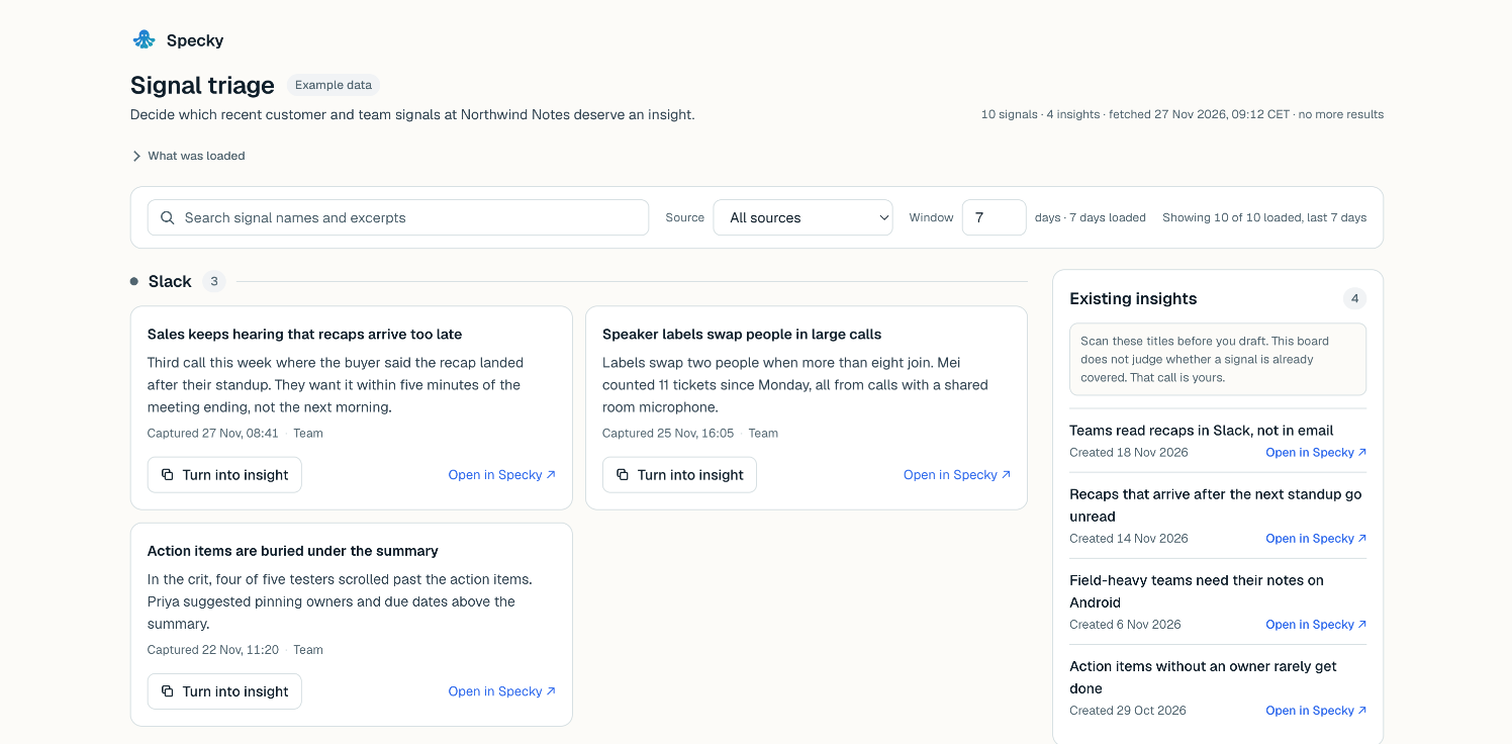
Triage is where feedback turns into product work, or dies in a channel. The hard part is not reading the signals. It is deciding which ones are new and worth an insight.
What it shows
- Signals grouped by source, newest first, each with its excerpt and when it was captured.
- Existing insights in a side panel, so you can spot a duplicate before drafting.
- A Turn into insight button on each signal that hands it to the chat. Claude drafts the insight there and saves it only after you approve.
- A source filter, search and a window you can change without rebuilding.
Why it asks before saving
Saving an insight changes your workspace and shows up for your team, so the chat always asks first. Specky also doesn't record which signals an insight cites, so the board never marks a signal as covered. That call stays yours.
A triage session
Once or twice a week, open the board and work down one source at a time. For each signal, check the insights panel first. Already covered? Move on. A new pattern? Press Turn into insight and Claude drafts a title and summary that quote the signal. You tighten the wording and approve. Ten minutes later the week's feedback is either in an insight or consciously skipped. Duplicates are how an insight list rots, so the side panel matters more than the button.
Make it yours
Change the window right on the board, or ask Claude to show one source only, or a longer window for a monthly review.
What it reads
Your recent signals and your existing insights, through Specky's read-only tools. The data goes only to the chat you are in.
Build it
In Claude with the Specky connector, say "Build my signal triage board with Specky." The signal triage guide has the recipe. In ChatGPT, ask "which signals deserve an insight?" and it finds the same recipe.
Keep reading
Sort Customer Signals by Your Own Product Areas
Name your product areas once. Specky files every new signal under them, with the source and classification confidence you can check.
Why Did Signups Drop? Answering Product Questions With Evidence
Your dashboard says what changed, not why. Specky checks the live source, adds customer context and gives you an answer with its evidence and unknowns.
Import Customer Feedback From a CSV, Doc or URL
You already have feedback in exports and docs. Upload a file, add a URL or paste a batch, and Specky turns it into signals you can group and quote.