Hear Your Customers by Source: A Customer Intel Board
Where is the feedback coming from this week, and what is it saying? Claude lays out your Specky signals by source with the latest quotes.
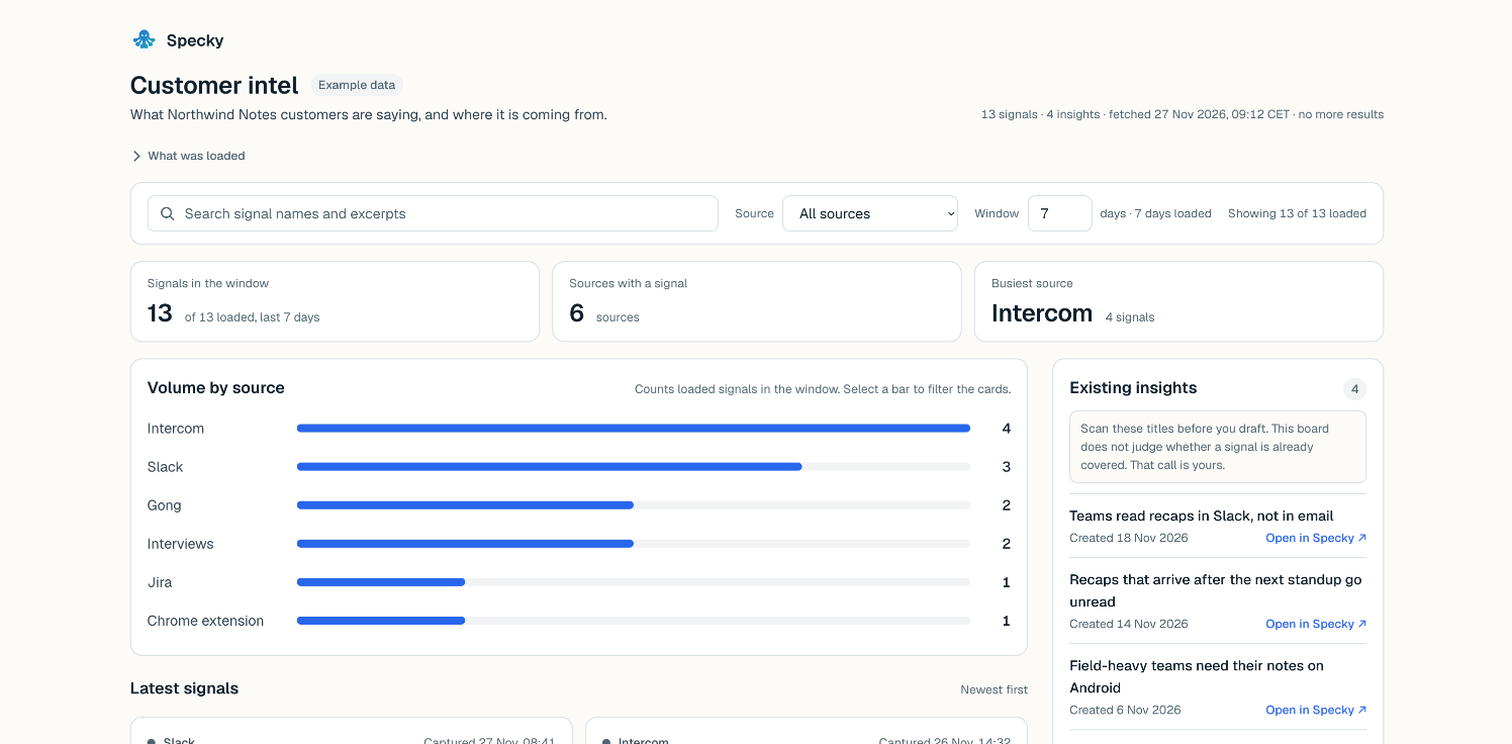
Customer feedback arrives in five places at once: a Slack thread, an Intercom chat, a Gong call, a Jira ticket, a note you clipped from a forum. Each tool shows you its own slice. None shows you the whole week.
What it shows
- A header strip: signals in your window, how many sources they came from, and the busiest source.
- Volume by source as a simple bar list. Click a bar to filter.
- The latest signals as cards with the quote, source and time, each linking back to Specky.
- Your existing insights alongside, so you spot a duplicate before writing a new one.
Counted honestly
Only customer and team sources count as signals here. Specky's own documents and agent records stay out. Counts are of what was actually loaded, and if more signals exist than one call returns, the board says so instead of rounding the week down.
The Monday read
Open the board at the start of the week. The header tells you how much came in and which source is loudest. If one source suddenly carries most of the signals, read those quotes first: a spike in one place is often one incident, not a trend. Then scan the insights alongside before you write anything new, so the same complaint doesn't become three insights.
Make it yours
Filter by source, search for a feature name, or change the window on the board without rebuilding it. Ask Claude for anything else, like a longer window for a monthly review.
What it reads
Signals from whatever you connected, such as Slack, Jira, calls or the Specky Chrome extension, plus your existing insights, all through Specky's read-only tools. The board saves nothing.
Build it
In Claude with the Specky connector, say "Build my customer intel board with Specky." The customer intel guide has the recipe. In ChatGPT, ask "what are customers saying?" and it finds the same recipe.
Keep reading
Sort Customer Signals by Your Own Product Areas
Name your product areas once. Specky files every new signal under them, with the source and classification confidence you can check.
Why Did Signups Drop? Answering Product Questions With Evidence
Your dashboard says what changed, not why. Specky checks the live source, adds customer context and gives you an answer with its evidence and unknowns.
Import Customer Feedback From a CSV, Doc or URL
You already have feedback in exports and docs. Upload a file, add a URL or paste a batch, and Specky turns it into signals you can group and quote.