A Roadmap Board That Never Invents a Quarter
Ask Claude for your Specky roadmap as a board: columns by target quarter, quiet items flagged, decisions alongside, and no made-up dates.
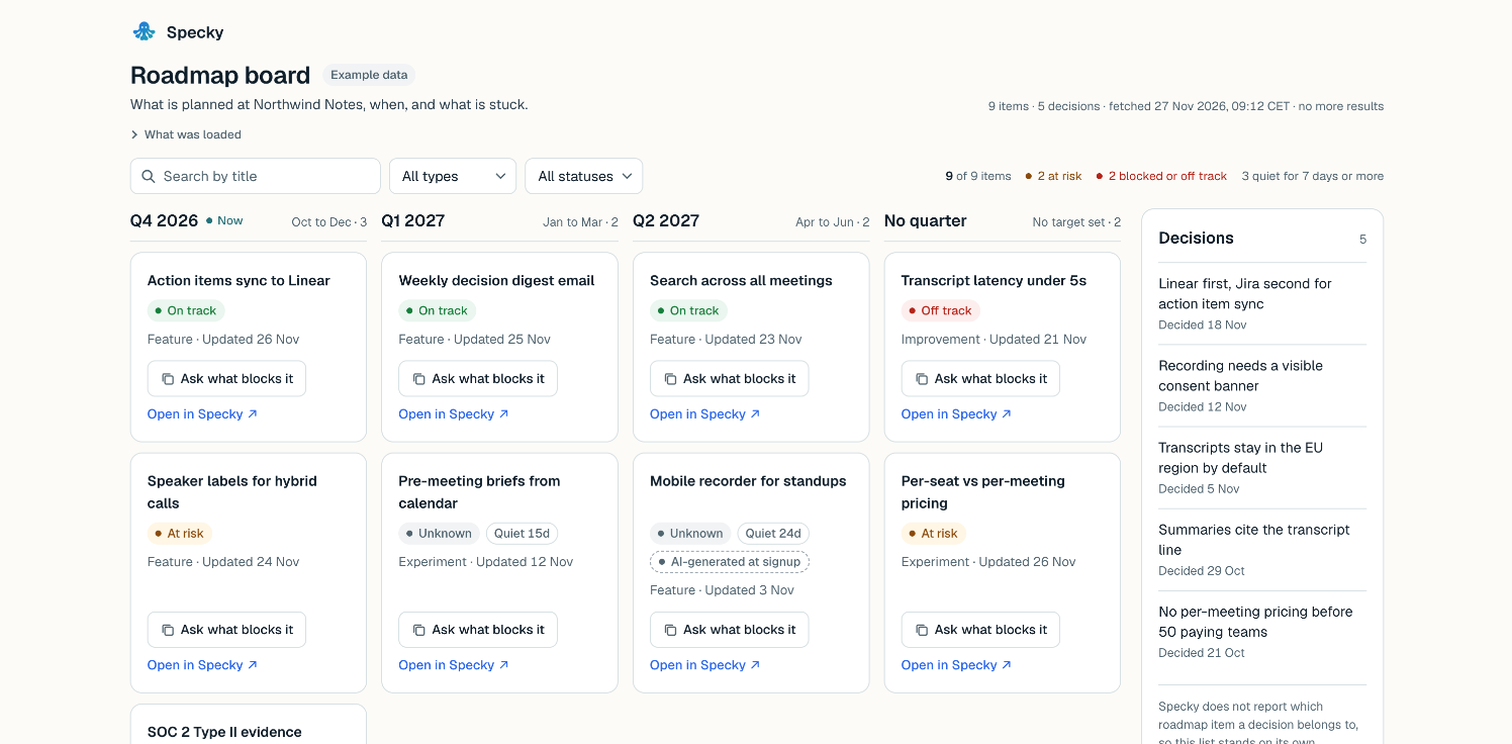
Roadmap tools tend to lie a little. Something without a date gets dropped into "next quarter" because the column needs filling. A stale item keeps its green badge because nobody touched it.
The Specky roadmap board doesn't do either.
What it shows
- Columns by target quarter, earliest first, and a No quarter column for everything without a date. No quarter is ever guessed.
- Cards with title, type, status and last update, each linking to the item in Specky.
- A quiet badge on anything not touched within your window, so a stalled item can't hide behind an old status.
- Your decisions in a side list, with filters and search.
What it won't do
Specky doesn't record which decision belongs to which roadmap item, so the board never draws that line for you. Want to know what is blocking an item? Each card copies a prompt for the chat, and Claude answers there without changing anything.
A planning session with it
Open the board before planning. Start with the No quarter column: everything there is either unscheduled on purpose or forgotten, and the board makes you decide which. Then look for quiet badges in the current quarter, because a stalled item there is the one most likely to slip. Finally, check the decisions list for anything that changes scope.
Make it yours
Ask Claude for a longer quiet window, one item type only, or a compact view to share in a call. The board only reads: to move an item to another quarter, change it in Specky. It is a snapshot with its fetch time, unless your client can refresh it.
Build it
In Claude with the Specky connector, say "Show me my roadmap as a board." It reads your roadmap through list_roadmap_items, a new connector tool that returns roadmap items and quarter-targeted documents together. The roadmap board guide has the full recipe. In ChatGPT, ask "show me my roadmap as a board" and it finds the same recipe.
Keep reading
RICE, ICE and Priority Poker With the Evidence in View
Score bets with RICE, ICE or your own weights while the customer evidence stays on screen. See where the team disagrees, and flag roadmap items nobody decided.
Plan a Roadmap That Fits Your Team's Real Capacity
Score bets independently, test them against real capacity, flag drift and share a Now, Next, Later story, all from one plan with the reasons attached.
A Goal Tracker That Never Fakes a Percentage
Goals by quarter, at-risk ones first, and a progress bar only where the numbers support one. Built by Claude from your Specky workspace.