Clickable Prototype Testing: Can Users Finish Without You?
Your prototype will pass every test if you help it. Here is how to find out whether people can finish without you, and whether anyone asks for it.
Share
Clickable prototype testing means giving someone a realistic, tappable mockup of one key flow, telling them only the goal, and watching in silence whether they can finish without help. It finds where a flow breaks before anyone writes code, and it gives a first, honest read on desire: does anyone ask when they can have it? Below are a free template, a script and a pass signal.
Key takeaways
Test five people per round. Jakob Nielsen's model has five users finding about 85% of usability problems, and he advises three rounds of five over one round of 15 (Nielsen Norman Group, 2000).
Polish adds less than you'd expect. In a MeasuringU review of 11 studies, most found no difference in the number of problems between low- and high-fidelity prototypes (MeasuringU, 2017).
Write the task as a goal. Words copied from the interface bias users (NN/g, 2014).
Set the pass signal first: at least 4 of 5 finish without help, and at least 3 ask, unprompted, when they can have it.
What is clickable prototype testing?
A clickable prototype is a mockup whose buttons, links and menus respond to taps, so a person can move through a flow as if it were real. Kara Pernice of Nielsen Norman Group describes prototype fidelity on three dimensions: interactivity, visuals, and content and commands (NN/g, 2016). A clickable prototype is high on interactivity, usually high on visuals, and should carry real content, not placeholder text.
The session itself follows the think-aloud recipe: recruit representative users, give them representative tasks, then "shut up and let the users do the talking" (Nielsen, NN/g, 2012). What makes it a product experiment is the last thing you listen for: whether anyone asks to have it.
In David J. Bland and Alex Osterwalder's Testing Business Ideas, the clickable prototype is the first interaction prototype in the validation library. The paper prototype and the storyboard sit earlier, among the discovery-stage discussion prototypes. Strategyzer's experiment library rates it 2 out of 5 for cost, setup time, run time and evidence strength, under desirability ().
What does a clickable prototype need, and what can you skip?
Every screen on one path, plus one thing that goes wrong, such as a failed payment
Real content: names, prices and dates people recognise
A "not in this prototype" screen behind anything you didn't build
No back end, no real data, no login
When should you use a clickable prototype test, and when not?
Use it once a flow makes sense on paper, and you want to see it hold up in something close to the real thing. It can also show desire: a prototype is often the first time someone says, "When can I have this?"
Do not use it for a flow that depends on real data or speed, because a mockup fakes both. Nielsen's limits show why speed matters: 0.1 second feels instant, 1 second keeps the train of thought, and past 10 seconds attention drifts (NN/g, 1993). A prototype is always instant.
Do not spend weeks making it perfect. The GV design sprint sets the bar: build in one day, with "just enough quality to evoke honest reactions from customers" (Knapp and Zeratsky, design sprint guide), then test with five customers the next day (Knowledge at Wharton, 2016).
If you are still unsure about the order of steps, a paper prototype is faster. To test a version that already works, run a usability test.
What about prototypes made with AI app builders?
They lower the build cost, not the bar. Pernice warns that polished prototypes are harder to give up. Test a generated app the same way: one job, five people, silence. Our guide to validating an AI prototype covers what comes after.
Which risk does it test, and how strong is the evidence?
This tests desirability: can people get through this, and do they want it? The evidence is behaviour, because you watch what people do. Asking "when can I have it?" is encouraging, but it costs them nothing.
Alex Osterwalder's rule of thumb is that what people say and do differ, so evidence gets stronger the closer it gets to a real purchase (Strategyzer, 2017). That is why the request is the weaker half of the pass signal. For what comes next, see our guide to choosing a product experiment.
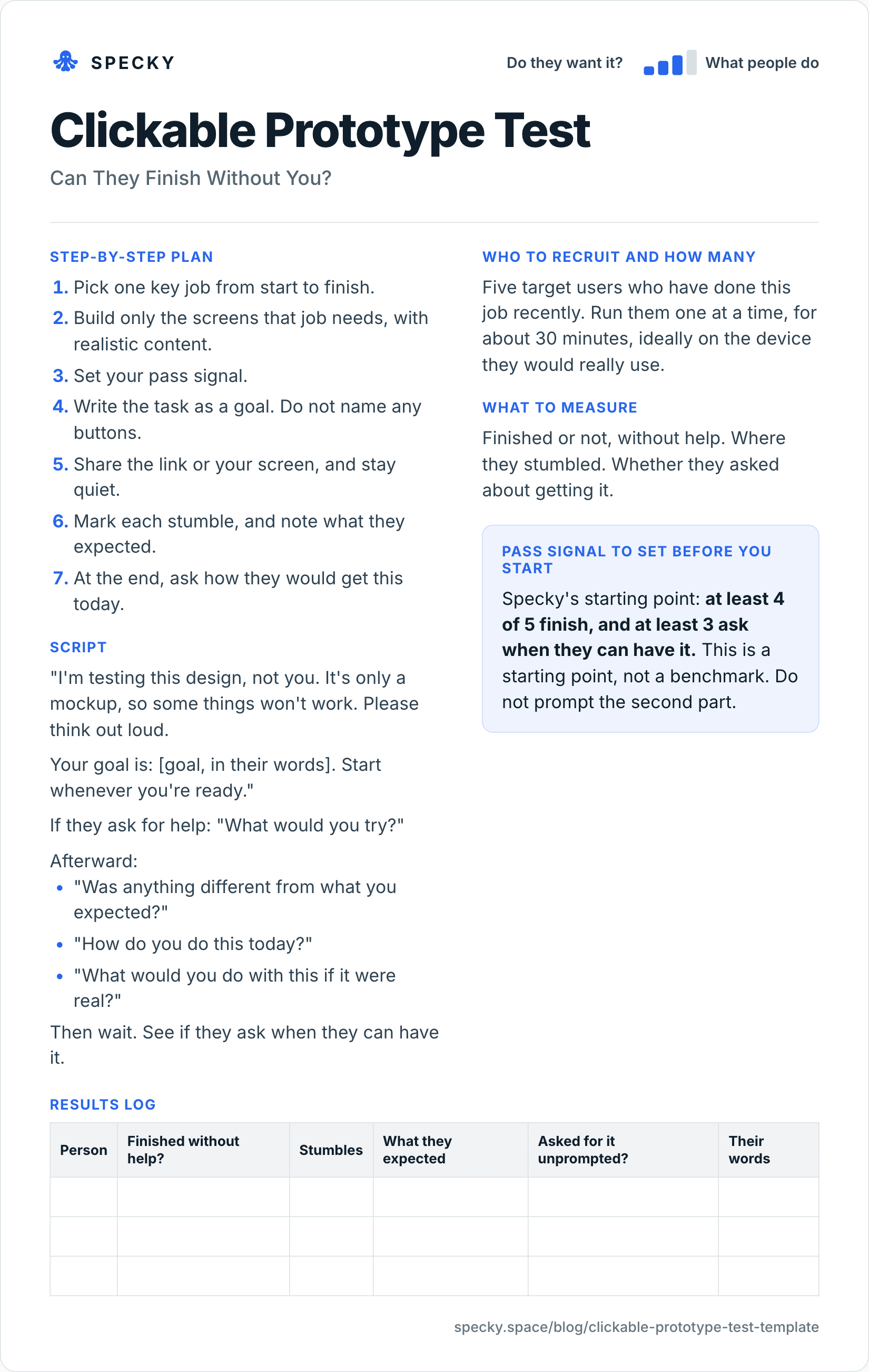
Clickable prototype test template (copy and use)
Open the image at full size, or copy the text version below.
Who to recruit and how many
Five target users who have done this job recently. Run them one at a time, for about 30 minutes, ideally on the device they would really use.
Step-by-step plan
Pick one key job from start to finish.
Build only the screens that job needs, with realistic content.
Set your pass signal.
Write the task as a goal. Do not name any buttons.
Share the link or your screen, and stay quiet.
Mark each stumble, and note what they expected.
At the end, ask how they would get this today.
Script
"I'm testing this design, not you. It's only a mockup, so some things won't work. Please think out loud.
Your goal is: [goal, in their words]. Start whenever you're ready."
If they ask for help: "What would you try?"
Afterward:
"Was anything different from what you expected?"
"How do you do this today?"
"What would you do with this if it were real?"
Then wait. See if they ask when they can have it.
What to measure
Finished or not, without help. Where they stumbled. Whether they asked about getting it.
Pass signal to set before you start
Specky's starting point: at least 4 of 5 finish, and at least 3 ask when they can have it. This is a starting point, not a benchmark. Do not prompt the second part.
Results log
Person
Finished without help?
Stumbles
What they expected
Asked for it unprompted?
Their words
How do you run a clickable prototype test step by step?
The template covers the plan. These rules cover the session:
Pilot it with a colleague, on the right device. Pernice advises pilot-testing any prototype. Fix dead links before a real user finds them, and test a phone flow on a phone.
Write the goal with no interface terms. NN/g's Marieke McCloskey warns that step descriptions and interface words hand people clues. "Click Export" tests reading; "Your accountant needs last month's readings by Friday" tests the flow.
Decide what counts as help before you start. Pointing, hinting or explaining a screen all mean that person did not finish unaided.
Answer questions with questions. Nielsen notes that careless prompts change behaviour and make results unrepresentative.
Count only unprompted requests. Ask the closing questions, then stop talking. A request after you mention availability does not count.
Book 45-minute slots. Thirty minutes with the person, 15 to reset and write notes.
What should you measure in a clickable prototype test?
Measure
How to record it
Why it matters
Finished without help
Yes or no, per person
The core behaviour. One hint means no
Stumbles
Screen, what they did, what they expected
Tells you what to fix
Unprompted request
Yes or no, with their exact words
The first, weak sign of desire
Time on task
Skip it
Prototypes predicted ease ratings, not task times, in a 2009 study by Sauer and Sonderegger (MeasuringU, 2017)
For context, Jeff Sauro analysed 1,189 tasks from 115 usability tests with 3,472 users. The average completion rate was 78%; the top quarter of tasks scored above 92% and the bottom quarter below 49% (MeasuringU, 2011). Specky's 4-of-5 bar is 80%, close to that average.
Mind the small sample, though. Four of five is 80%, but a 95% adjusted-Wald confidence interval around it runs from roughly 36% to 98%. The pass signal is a rule for what to do next, not a measurement of the product.
How many users do you need for prototype testing?
Five per round, of one type of user. In Nielsen's model one user finds 31% of problems on average, five find about 85%, and users six to 15 add little (NN/g, 2000). The design sprint agrees: Knapp and Zeratsky's guide runs all five interviews in one day and says big patterns emerge after five (design sprint guide).
Two user types? Test three to four of each. And five finds problems; it does not prove demand. Three of five asking is a sniff test, so confirm it with something stronger, such as a letter of intent.
Clickable prototype vs paper prototype vs usability test: which should you use?
Whether the flow holds up close to real, plus first signs of desire
Whether the shipped version works with real data and speed
Misses
Scrolling, speed, visuals, real data
Real data and real speed
Problems are now costly to fix
Move on when
4 of 5 finish without help
4 of 5 finish and 3 ask for it
Problems fixed and retested
Does polish make people less honest? Not clearly: in a 2003 study by Sefelin and colleagues, summarised by MeasuringU, people critiqued paper and computer prototypes equally, and 92% preferred the computer version.
What does a clickable prototype test look like in practice?
This example is made up to show the method. A small team is designing a way for landlords to collect a monthly meter reading from tenants by text message. They build a clickable flow in a design tool.
Five landlords try it. All five finish. But nobody asks when they can have it. Two say they have only two flats and would do it by phone. Three of the five say they would worry about tenants ignoring the text.
The first half of the signal passes and the second fails. The flow is fine, but the desire is not there yet. The team records the test as inconclusive and looks at landlords with many more units.
A second round, also illustrative: five landlords who each manage 12 to 40 flats. Four finish without help, and three ask, unprompted, when they can have it. Both halves pass. Ten 30-minute sessions, no code, and a clear next step: ask those three for a letter of intent.
What are the most common clickable prototype testing mistakes?
Naming the button in the task. "Click Export" tells you nothing.
Over-building. A polished prototype that took a month is no longer cheap.
Rescuing people. Your urge to help marks the finding.
Testing only the happy path. Include one thing that goes wrong.
Prompting desire. Asking "would you use this?" gets a yes.
When it doesn't work: for real data, real speed or price, and for value that only shows after weeks of use, where a diary study fits better.
Is it fair to test with a prototype that looks real?
Yes, if people know what they are using. Keep the script's opening line that it's only a mockup. Ask before recording a screen or voice, say how long you keep it, and never promise a launch date to test a reaction. If an invite page collects names, say there that it is a prototype. Pay people for their time: the design sprint guide's authors usually give $100 gift cards.
How to run it in Specky
On the Assumptions page, click the note and choose Pick a test, then Clickable prototype. Specky fills in the steps, the pass signal, and a one-week timeline.
Build the clickable flow in your design or prototyping tool. Specky does not host the prototype on this test.
Click Test with a page. Specky builds a Prototype invite page with a "Try the prototype" call to action, and collects who wants in.
Click Start running. Run the sessions, paste in what happened, and record the result.
A pass shows on the board as Supported, because finishing a task is behavior.
Unclear: They could finish, but nobody cared, or the reverse. Treat these as separate problems. Fix the flow, or find people with a stronger need.
Contradicted: Most people could not finish. Fix the flow and test again. Any bet resting on this note now shows as Contradicted.
Frequently asked questions
What is a clickable prototype test?
A clickable prototype test gives people a tappable mockup of a product and watches whether they can finish a real task without help. It finds problems before any code is written. Unlike a plain usability check, it also listens for desire: whether people ask, without prompting, when they can have the product.
How many people should test a prototype?
Five target users is a practical starting point for one round. Nielsen's model estimates five users find about 85% of usability problems. Fix what you find, then test again rather than running more people through the same design. If you have two distinct user types, test three or four of each.
What is the difference between a prototype test and a usability test?
A prototype test uses a mockup before anything is built. A usability test uses a working version of the product, with real data and real speed. Both watch real people try to complete a task. Prototype tests are cheaper to change; usability tests catch problems a mockup fakes, such as slow responses.
How long does a clickable prototype test take?
About a week. Building one flow takes one to a few days; the design sprint builds it in a single day. Five 30-minute sessions fit into one day. Allow an afternoon afterwards to compare notes, fix the worst stumble and decide on the next test.