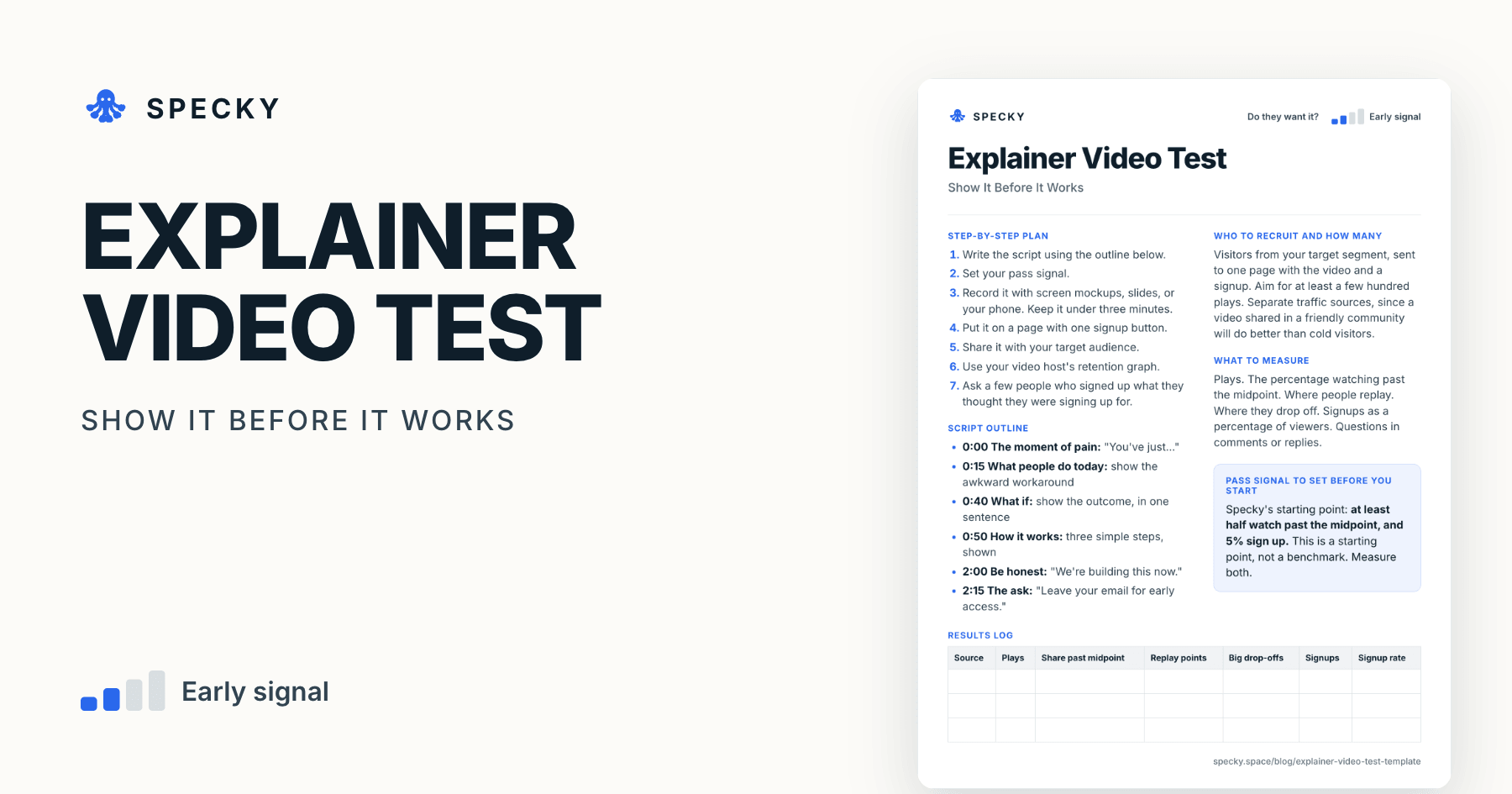
Explainer Video Test Template: Show It Before You Build It
When an idea is hard to explain and slow to build, show it first. Then measure who watches past the midpoint, where they replay, and who signs up.
Share
An explainer video test shows the job and your offer in a two-to-three-minute video, on a page with one signup, before the product works. It then measures how many viewers watch past the midpoint, where they replay or drop off, and who signs up. Use it when an idea is hard to describe but easy to show, and slow to build.
Key takeaways
The explainer video is one of the "discussion prototypes" in David J. Bland and Alexander Osterwalder's Testing Business Ideas (Wiley, 2019), a library of 43 experiment types (Strategyzer).
Dropbox is the famous case. Drew Houston's own slides record a 3-minute screencast on Hacker News in April 2007, and a beta waiting list that jumped from 5,000 to 75,000 in one day in March 2008 (Houston, 2010).
Short holds attention. In Wistia's analysis of more than 13 million videos, those under a minute average a 52% engagement rate (Wistia, 2025).
Views prove nothing. Read the retention graph: YouTube says spikes mean people are rewatching and dips mean they are leaving or skipping.
Specky's starting pass signal: at least half watch past the midpoint, and 5% sign up.
What is an explainer video test?
It is a demand test that uses a short video in place of a product. You show the moment of pain, the awkward workaround, and what the world looks like with your solution, then ask for an email.
The method sits in the experiment library of Testing Business Ideas. A Universitat Politècnica de València (UPV) course built on the book lists the explainer video among "discussion prototypes", with the storyboard, the brochure, the data sheet, the boomerang, pretend to own and the 3D print (UPV course slides). Each shows people something concrete to react to before it is built.
Which risk does it test, and how strong is the evidence?
This tests desirability: when people see it, do they want it? The evidence is directional. Watching and signing up are real, but a persuasive video can sell a future that the product never delivers. See our guide to choosing a product experiment for stronger follow-ups.
What did Dropbox's video MVP actually show?
It showed interest, from the right audience, before a public launch. The details matter, because the story is often retold loosely:
Date
What happened
Source
4 April 2007
Houston posts "My YC app: Dropbox - Throw away your USB drive" on Hacker News, linking a demo video
Ries quotes Houston directly: "Our beta waiting list went from 5,000 people to 75,000 people literally overnight." Three lessons travel well:
The video asked for a waiting-list signup, not money. That is the honest version of this test.
It spoke to one audience where it gathered. Houston's slides advise knowing where your target audience hangs out and speaking to them authentically.
Even Dropbox's first cut got "too long" feedback. A commenter on the 2007 Hacker News post said "It is too long".
One caution from the same slides: Dropbox's search ads later cost $233 to $388 per customer for a $99 product. A video can prove interest without proving a channel that pays.
When should you use an explainer video test, and when not?
Use it when your idea is hard to describe but easy to show, especially if building even a rough version would take months. Dropbox's overnight jump is a rare outcome. Your video need not go anywhere near that far to teach you something.
Do not use it when:
A plain sentence would do. A landing page is quicker.
You would have to show something as real when it is not. Say it is coming.
You have no way to reach the segment. A video nobody sees tests nothing.
The doubt is usability, not desire. People cannot use a video. Try a clickable prototype.
Copy-and-use explainer video test template
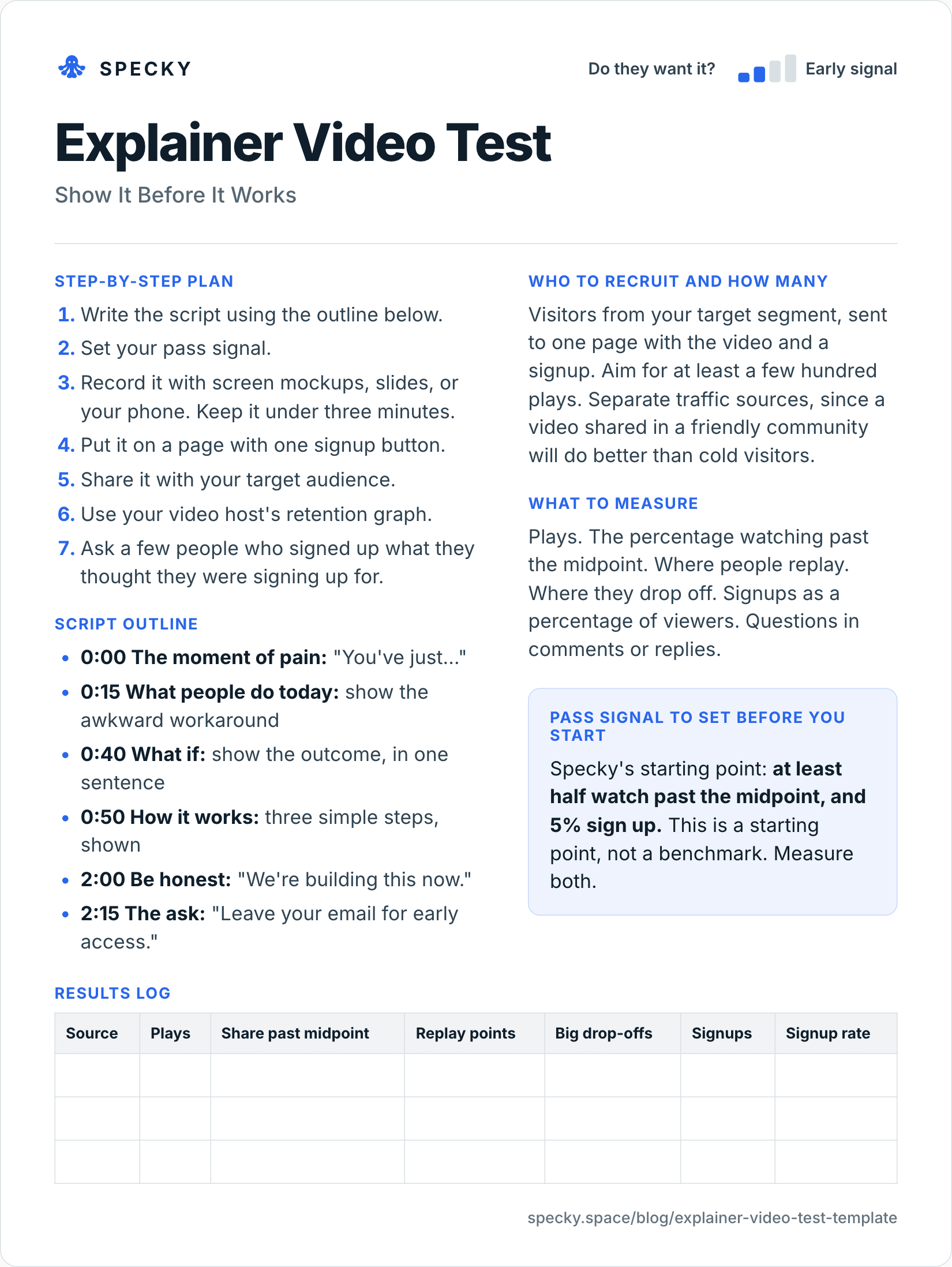
Open the image at full size, or copy the text version below.
Who to recruit and how many
Visitors from your target segment, sent to one page with the video and a signup. Aim for at least a few hundred plays. Separate traffic sources, since a video shared in a friendly community will do better than cold visitors.
Step-by-step plan
Write the script using the outline below.
Set your pass signal.
Record it with screen mockups, slides, or your phone. Keep it under three minutes.
Put it on a page with one signup button.
Share it with your target audience.
Use your video host's retention graph.
Ask a few people who signed up what they thought they were signing up for.
Script outline
0:00 The moment of pain: "You've just…"
0:15 What people do today: show the awkward workaround
0:40 What if: show the outcome, in one sentence
0:50 How it works: three simple steps, shown
2:00 Be honest: "We're building this now."
2:15 The ask: "Leave your email for early access."
What to measure
Plays. The percentage watching past the midpoint. Where people replay. Where they drop off. Signups as a percentage of viewers. Questions in comments or replies.
Pass signal to set before you start
Specky's starting point: at least half watch past the midpoint, and 5% sign up. This is a starting point, not a benchmark. Measure both.
Results log
Source
Plays
Share past midpoint
Replay points
Big drop-offs
Signups
Signup rate
How long should an explainer video be for testing an idea?
Under three minutes, and the shorter the better, as long as it still shows the outcome. Wistia's analysis of more than 13 million videos found that videos under a minute average a 52% engagement rate, meaning viewers typically watch about half, and that viewers typically watch more than half of educational videos between one and five minutes long (Wistia, 2025).
That puts Specky's bar of "half past the midpoint" in context: it is roughly what a good short video achieves, so a two-and-a-half-minute test video that clears it is holding attention well. Two rules follow:
Show the outcome by 0:40. The script outline does this. People who leave in the first minute should still have seen the point.
Cut anything that explains features. The test asks "do you want this?", not "do you understand every step?"
What should you measure in an explainer video test?
Measure attention and action, never views alone. YouTube's audience retention report, and similar graphs in other hosts, tell you where attention went (YouTube Help):
What you see
What YouTube says it means
What to do in a test
Flat line
Viewers watch that part start to finish
Keep it
Gradual decline
Viewers lose interest over time
Tighten the script
Spike
More viewers watching, rewatching or sharing that part
This is what grabbed people; lead with it next time
Dip
Viewers abandoning or skipping at that point
Cut or rework that part
Intro
Share still watching after the first 30 seconds
Fix the opening if it is low
YouTube notes retention data takes one to two days to process, so read it after the test ends, not hourly.
How many plays do you need?
Divide the signups you want to learn from by your signup bar. At 5%, 300 plays give about 15 signups and 600 plays about 30. With fewer than 200 plays, a single extra signup moves the rate by half a point, so treat the result as a hint.
Worked example (hypothetical)
This example is made up to show the method. A team has an idea for a tool that turns a messy spreadsheet into a working internal app. The idea is hard to explain, so they mock up a flow in slides and record two and a half minutes.
Six hundred people watch it, mostly from a community for operations staff. Sixty-two percent get past the midpoint. Many replay the moment the spreadsheet becomes a form. But only 2.1% sign up, and several comments ask whether it can handle formulas.
Half of the signal passes. They record it as inconclusive, and answer the formula question in a second version, because the replays show which part really grabbed people.
Extending the example. 2.1% of 600 is about 13 signups. For version two, they change one thing: a 15-second segment showing a formula carried over into the app, placed right after the moment people replayed. They share it with the same community. Say it gets 520 plays, 59% past the midpoint and 28 signups, or 5.4%. Both halves now pass. Before moving on, they email five of the 28 and ask what they thought they signed up for. Three describe the product as intended; two expect a full database replacement. That gap goes into the next test, not the roadmap.
Explainer video test vs landing page test vs clickable prototype
If you can write the promise as a headline, run the landing page test first; it is faster. Use the video when the headline alone leaves people confused.
Is it honest to show a product that doesn't exist yet?
It is, if the video says so. Three rules:
Say it plainly in the video and on the page: "We're building this now." The script outline puts it at 2:00 for that reason.
Label mockups as mockups. Slides and screen designs are fine; faked "live" footage is not.
Take emails, not money, and tell signups what happens next, including if you stop.
If you promote the video with Google Ads, its Misrepresentation policy bars promising products that are unavailable and claims that entice people with an improbable result (Google Ads policy).
Common mistakes
Pretending it's finished. Say clearly that you are building it.
Making it too long. Most people will not stay for a slow start.
Polishing for weeks. A rough video that answers your question beats a beautiful one that arrives late.
Counting views. Views are not interest. Use retention and signups.
Skipping the follow-up. People may sign up for something very different from what you intended.
How to run it in Specky
On the Assumptions page, click the note and choose Pick a test, then Explainer video. Specky fills in the steps, the pass signal, and a one-week timeline.
You run this one. Specky keeps the plan and the result. Record the video, host it, and put it on a page with a signup.
Click Start running. Paste your retention numbers and signups onto the test.
Record the result.
A pass shows as Early signal on the board, not Supported, because watching and signing up for something unbuilt is rated directional.
What to do with each outcome
Supported (shows as Early signal): Contact the people who signed up. Try delivering the promise by hand with a concierge test, or build the clickable prototype.
Unclear: People watched but did not sign up, or the opposite. Replay points show what grabbed them. Drop-offs show what lost them. Change one thing and run it again.
Contradicted: They did not watch, or did not care. Check that the right audience saw it, then rethink. Any bet resting on this note now shows as Contradicted.
Frequently asked questions
What is a video MVP?
A video MVP, or explainer video test, shows how a product would work before it is built, and measures who signs up. Dropbox is the best-known example: a 3-minute screencast on Hacker News in 2007, then a beta launch video in 2008 after which its waiting list grew from 5,000 to 75,000 in a day.
How long should an explainer video be for testing an idea?
Keep it under three minutes, and shorter if you can. Wistia found videos under a minute average a 52% engagement rate. Open with the moment of pain, show the outcome within 40 seconds, and say plainly that you are still building it. Cut anything that explains features in detail.
What should I measure in an explainer video test?
Measure the share of viewers who watch past the midpoint, where people replay or leave on the retention graph, and how many sign up. Specky's starting bar is half past the midpoint and 5% signups. View counts alone tell you very little, because a play is not a decision.
Do I need a professional video?
No. Slides, screen mockups or a phone recording are enough, as long as the outcome is clear. Dropbox's first video was a plain screencast. Spend your time on the script and on reaching the right audience, because a polished video shown to the wrong people teaches you less than a rough one shown to the right ones.
Is an explainer video test enough to start building?
No. It is directional evidence that people want the promise, not proof they will pay or can use it. Follow it with a concierge test that delivers the promise by hand, a clickable prototype for usability, or a presale for willingness to pay. Talk to the people who signed up first.